BEAST - Embedding Analysis and Selection Tool
Try the BEAST demo
A demo instance of BEAST is running. You need a username and password to log in. We hand them out at the World Conference on Marine Biodiversity (WCMB 2026). You can also request them in our first survey:
- Before you try BEAST: We kindly ask you to take our survey. It asks what you need, what your data looks like and how you want to use BEAST.
- Try BEAST: open the demo, our tutorial can guide you.
- After you try BEAST: Afterwards, we would be thankful for your feedback. We prepared a second survey. It asks what worked, what did not, and what you could not find. You can also send your feedback to aqqua@geomar.de.
Each survey takes about three minutes, and every question is optional. At the end of survey 1 you can leave your e-mail address. We can then send you the login data and add you to the BEAST newsletter or the AqQua newsletter.
On this page
BEAST is a browser-based tool to explore, analyse and annotate large image collections. It lays out a whole collection as one interactive map, in which similar images lie close together. A second view shows a selection of the actual images, so that you can see what the map represents. You can zoom and pan both views interactively, for example to examine a single cluster of similar images up close.
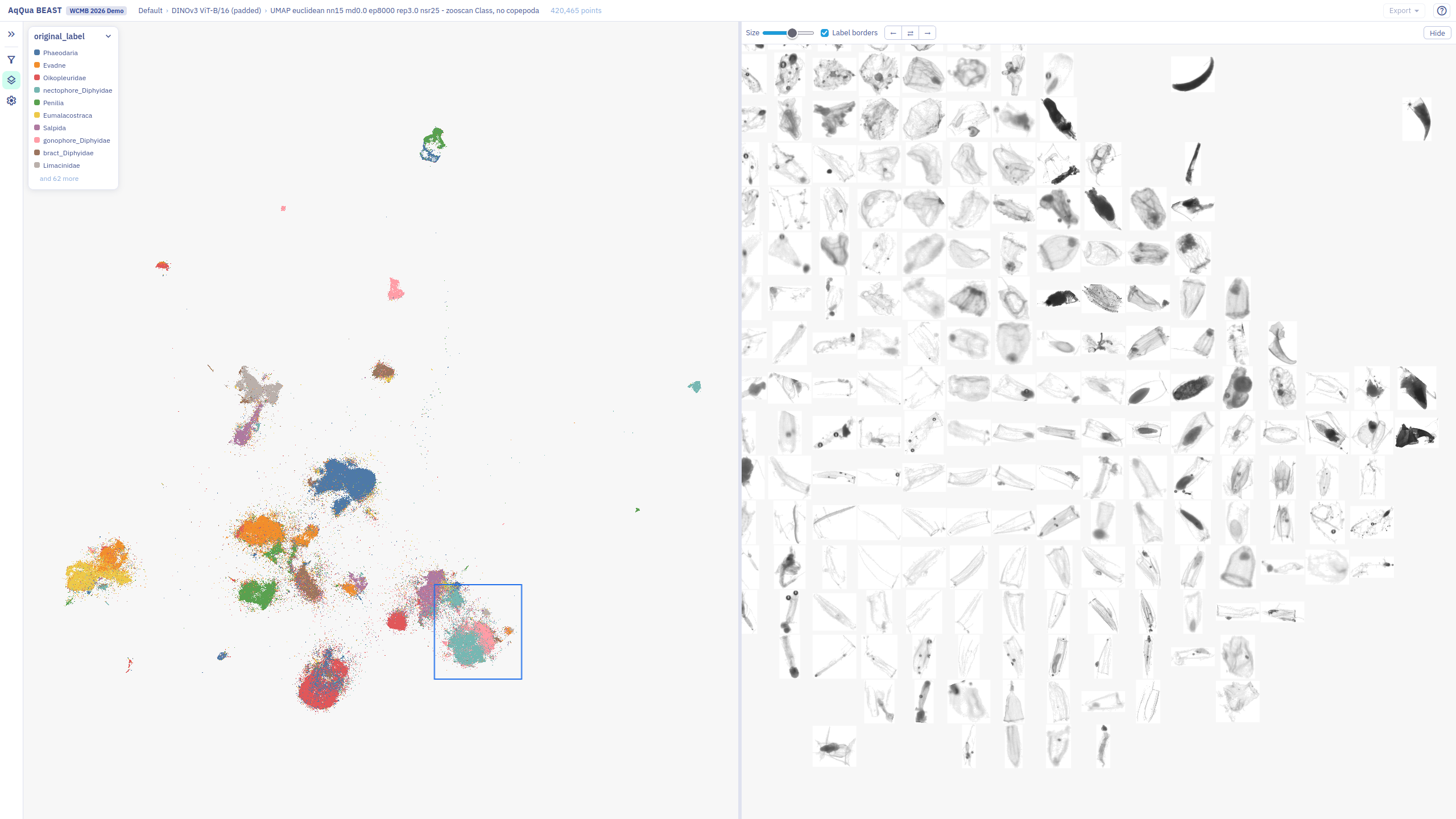
Scalability is the main design goal of BEAST. We built it to work with the AqQua dataset that consists of more than 7 billion images and will be used to train our foundation model. The browser never loads the whole collection. The first view shows a representative sample. When you zoom in, BEAST loads more points for the region that you look at. You can therefore keep zooming in to see more detail, and the size of the collection does not slow down the exploration.
We develop BEAST for two groups of users:
- Domain scientists who curate large image datasets. Curation by hand is slow and tedious. BEAST helps you to explore a dataset, clean it up and annotate it efficiently.
- Machine learning researchers who need to understand what their models have learned. BEAST lets you compare the representations of different models. You can use the comparison to evaluate a model and to steer its development.
BEAST is under active development. The current focus is dataset curation, and the demo shows this use. Curation matters for both groups. A cleaner dataset also gives machine learning researchers better models.
Large collections need exploration
A single plankton imaging deployment can come back with millions of images. A high-throughput microscope can produce as many in an afternoon. Nobody is going to look at all of them individually.
As a result, most images of a collection stay unseen. Common classes are easy to find, while rare classes have to be looked for actively. Without tedious exploration, unexpected patterns can go unnoticed.
BEAST makes this exploration efficient. The whole collection is laid out in front of you. You decide where to look, discover what interests you, and choose how closely you want to look at it. You can then label what you find. You stay in control of where one class ends and the next begins.
Labels serve two purposes:
- Analysis. Labels let you analyse the dataset. How often does a class occur? How does this change over time, with depth or across other metadata?
- Training. Labels are training data for a deep learning classifier. The classifier can then annotate future datasets of the same kind.
How BEAST works
1. A foundation model reads every image
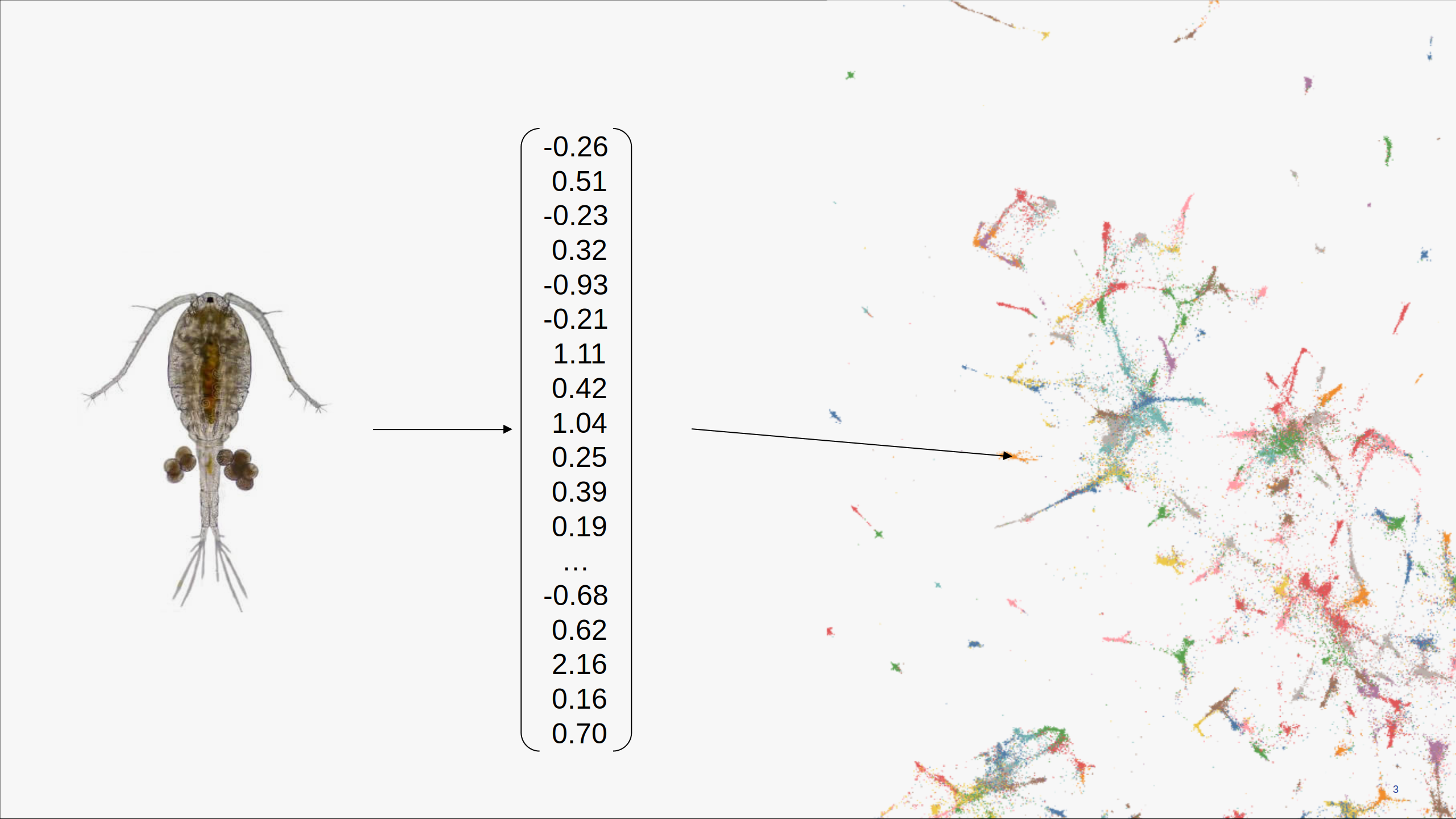
Before you see anything, a self-supervised model has already been through the whole collection. It turns each image into a few hundred numbers that describe its content. That vector is called an embedding.
Self-supervised means the model learned from the raw images alone without any labels or annotation. Images that look alike to the model end up with similar embeddings. So you get a robust similarity measure across the entire collection before anyone has classified a single specimen.
Part of the AqQua projects is to provide such a self-supervised model trained on a huge image set across a variety of imaging modalities resulting in a robust and detailed description of image content.
2. BEAST computes a map
An embedding has several hundred dimensions, making it cumbersome to work with directly. BEAST projects the complete collection down to 2D using well-established algorithms - e.g. UMAP (McInnes et al., 2018) or t-SNE (van der Maaten and Hinton, 2008). Similar images land near each other, and groups of similar organisms appear as visible clusters. Structure you would otherwise have to go looking for becomes something you can simply point at.
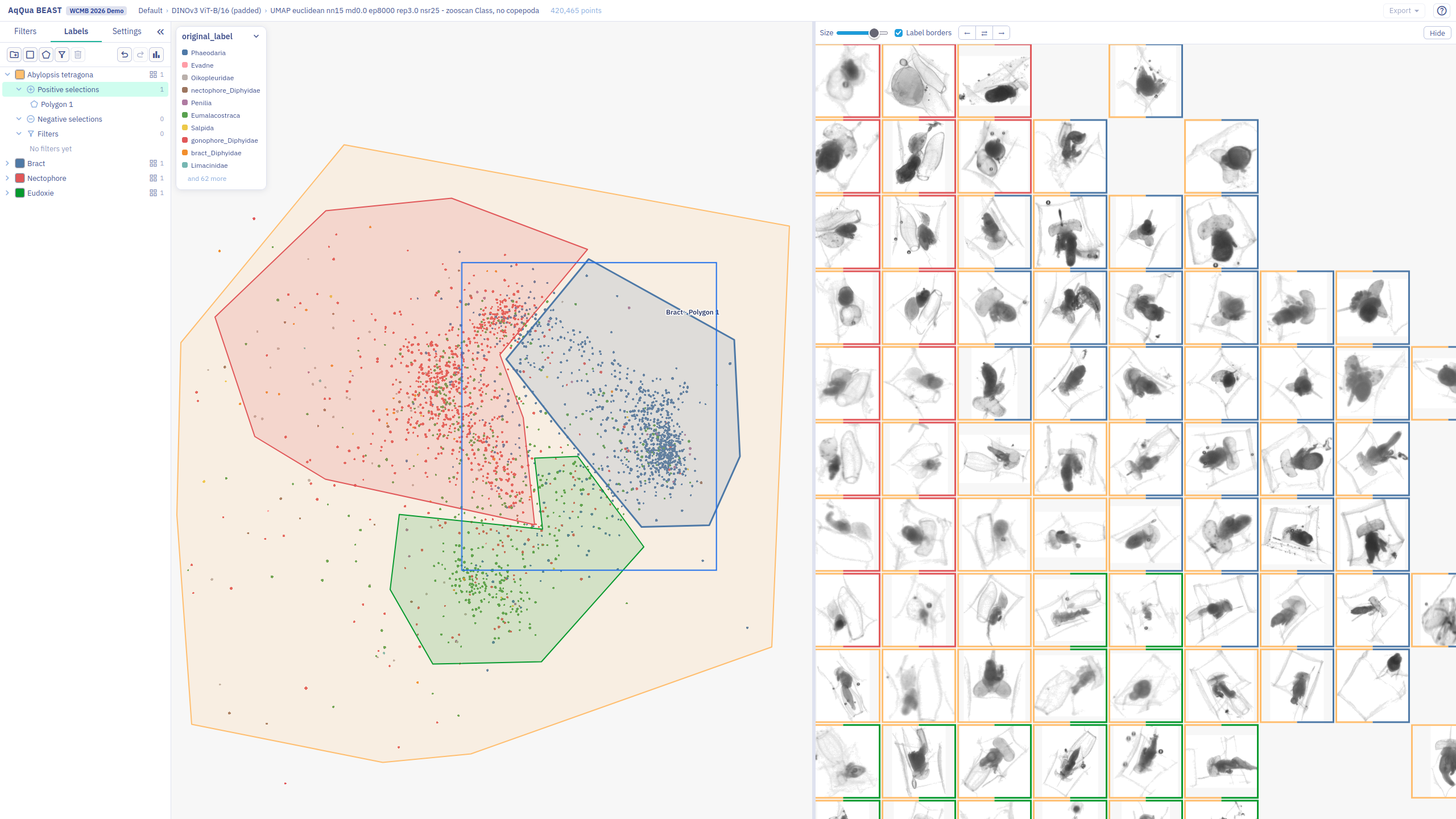
Structure also exists inside a cluster. Images of one species can form separate regions by body part, and specimens that carry eggs can form a region of their own. You can zoom into a cluster to find these regions.
3. Explore the map, next to the images
BEAST shows two linked views side by side. In the map, every point is one image. The image view fills the same space with a readable subset of the actual images. You can zoom and pan both views. You never have to trust an abstraction, because the images are right there.
You can colour the points by metadata, to see how a variable relates to image content. You can also filter by metadata, such as date, depth, region or instrument, or by explainable image features, such as size or brightness.
Recompute on a subset. One 2D map of millions of images cannot keep every detail. Dense regions can merge into one blob. Select a region and recompute the map for the images inside it. The new map uses the whole screen for these images only, and it reveals structure that the first map lost.
4. Turn selections into classes, and classes into a model
Draw a selection onto the map. The selection becomes a label on the images underneath, with any active filters taken into account. You can recompute the map inside a selection to reveal finer detail and select again, as far as the material rewards it.
Classes can overlap, so one image can belong to more than one class. Classes can also be hierarchical, so one class can sit inside another. The structure follows your domain, and not a fixed taxonomy.
You can label more than the taxon. Typical examples are life stage, sex, damage and image quality, such as blur or a wrong crop.
The classes are labels, and labels can train a supervised classifier. The classifier then annotates the rest of the collection, and future collections of the same kind.
Want to try it? The tutorial walks through each step with the demo.
Scale and deployment
Your browser never downloads the whole collection. The server prepares the map as a pyramid of tiles and sends only the tiles you are actually looking at, so panning and zooming stay smooth whether the collection holds ten thousand images or a billion.
There are two ways to run BEAST:
- Server deployment, for a group or an institute that shares one instance. BEAST runs on a server, and several users log in with their institutional account. It is built for large collections. A search database holds the embeddings and the metadata, so filters and selections stay fast. An object store holds the images and the map tiles. A GPU cluster computes new reductions on demand.
- Local deployment, for one person on one computer. BEAST runs on a single machine. Images, metadata and map tiles are read from the local disk, and your own computer computes the reductions. A GPU makes large reductions faster, but it is optional.
Built for the community
We want BEAST to be useful to many scientists, not only to our own project. We are building it as open, reusable software for groups who work with large image collections.
Real image collections teach us more than we can learn alone. If a funding application that we submitted is successful, we plan to work with a small number of pilot partners. Pilot partners would help to shape the design, try early versions and tell us what gets in the way. They could also develop BEAST with us and contribute code. We plan to release BEAST as open source, with contribution guidelines and a review process for external contributions.
We cannot promise this yet. We can already talk, though. If you have a large image collection and no good way to explore it, tell us about your use case: aqqua@geomar.de
References
- McInnes, L., Healy, J. and Melville, J. (2018). UMAP: Uniform Manifold Approximation and Projection for Dimension Reduction. arXiv preprint arXiv:1802.03426.
- van der Maaten, L. and Hinton, G. (2008). Visualizing Data using t-SNE. Journal of Machine Learning Research 9, 2579–2605. jmlr.org/papers/v9/vandermaaten08a.html.